
Any inbound communication can pose a threat to an organisation, and file sharing is no exception. Files received from third parties can contain malicious code embedded within seemingly harmless documents.
Security solutions do not interact with threats the way humans do. This is why certain types of malware evade most traditional security tools, such as password-protected attachments, quishing (QR code phishing), and data hidden within images.
Here are a few tips to help you stay protected!
Password-protected attachments
The irony of password-protected attachments is that, while they are intended to enhance security, most security tools bypass scanning them because they lack the necessary passwords to open them. Instead of being analysed, they are flagged as unopenable files and are delivered by default to the recipient without any internal vetting.
Opening this type of file carries considerable risk. While there are several ways to circumvent this issue, the most effective and pragmatic approach is to block all password-protected files by default. If a user is expecting such a file from a trusted contact, they can manually authorise it in accordance with the organisation’s established protocols.
Delegating this task to already overburdened system administrators is counterproductive. Requiring them to collect passwords, and then manually open and scan every single file, slows down workflow and increases operational overhead.
The best approach remains training users to obtain passwords directly from verified senders and to apply cybersecurity best practices.
Quishing
Quishing is a phishing method that exploits QR codes. The underlying issue is that traditional security solutions scan URLs within the body of a message but rarely inspect images. Cybercriminals take advantage of the automatic, often unthinking reflex with which users scan QR codes—such as on restaurant menus, parking meters, or apps.
How do you counter this?
The first line of defense remains user vigilance. Only scan QR codes from trusted sources. Scanning an unknown code is equivalent to clicking on a suspicious link—a reflex that many users have already learned to avoid in emails.
In this scenario, just as with password-protected files, user awareness training is a key strategy for mitigating risk.
Regarding technical approaches to QR code verification, organisorations must deploy Deep Content Inspection (DCI) solutions. These solutions go beyond looking at words and phrases; instead, they search for sets of objects to help determine whether a message is hazardous.
This process involves examining the message structure and its origin. For instance, a file type might be renamed with a .txt extension, but closer inspection reveals it is actually an executable file. In one of the classic, early examples, the “Anna Kournikova” virus exploited precisely this vulnerability. Users received what appeared to be an image file (AnnaKournikova.jpg.vbs), but the malicious extension was appended to the end. To make matters worse, early versions of Outlook could not display the full filename. Although this is one of the oldest examples, this type of subterfuge is, surprisingly, still used today.
In other instances, a file header may indicate a size of only 1,000 bytes, but deep packet inspection reveals its actual size is 3,000 bytes. Something is hidden inside, which is generally a bad sign.
Through Deep Content Inspection, every element of the email is scrutinized for suspicious behavior:
- Sender: Is the sender valid?
- Source: Is the sending host a legitimate sender for this domain?
- URL: Is it good or bad? What is its reputation? How long has it existed?
- Certificate: Is the TLS certificate still valid?
- Message Content: Is there fraudulent content?
- Attachments: What do they contain? What is their size?
When it comes to QR codes, they are inspected using Optical Character Recognition (OCR) or other code engineered specifically for this purpose.
From there, if the QR code contains a URL, the entire verification process is repeated. If the answer to any of these questions is “no,” the QR code is stripped out.
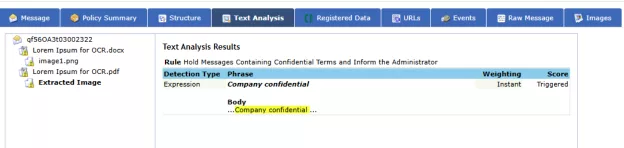
Let’s look at this in action. In the following two test files, one QR code contains the text “company confidential” and the other contains a URL.
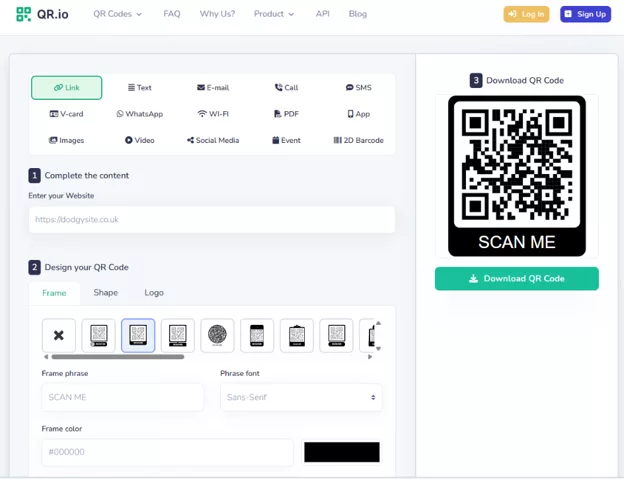
Example 1: In the first example, the solution detects the word “Confidential” and blocks the message. In a real-world scenario, instead of text, the QR code could contain a URL that, when scanned by a phone, opens a malicious link in the mobile browser. It could also prompt your phone to call a premium-rate number, driving up your monthly bill.
Example 2: In another scenario, a weaponised QR code containing a URL is neutralised and sanitised by our vendor Fortra’s solution, ensuring a safe image is delivered.

Data hidden in images
Closely related to quishing, this threat relies on steganography, a technique that involves concealing malicious code inside images or videos. While this code remains invisible to the human eye, it can be triggered to execute malicious actions or retrieve remote files.
Steganography tools are recommended to analyse these images and search for unexpected data within the file structure. Inside images, there are “pockets” within the file structure where attackers can insert malicious code. Steganography tools detect these codes and expose them.
For example, you might have a harmless file that appears to do nothing, but once extracted from the image file (via the steganography process), it can be weaponised. This could be new code or a URL pointing to a hosted file that can be downloaded and executed.
When an infected, or even merely suspicious, image arrives, email security solutions perform the following steps:
- Immediate decomposition of the email,
- Logging of the essential data that makes up the image,
- Removal of all parasitic or suspicious data,
- Reconstruction of the image.
In other words, the solution transforms the file to generate a fresh version of the image. This ensures that all “hidden” data is eradicated and the recipient receives clean data.
Conclusion
Modern cyber threats are becoming increasingly subtle, evading traditional security tools. To address them, it is essential to combine user training with advanced technologies.
By leveraging tools such as Deep Content Inspection, Optical Character Recognition, Secure Email Gateways, and packet analysis, you strengthen your organisation’s security posture and protect your exchanged data.